Time Management Systems: 18 Proven Methods To Take Back Your Day
Time management systems are structured approaches that help you decide what to work on, when to work on it, and how to protect your focus from the endless interruptions of modern life. In 2026, with remote work now standard for millions, AI tools reshaping workflows, and the constant ping of Slack, email, and video calls, having a reliable system isn’t optional—it’s essential for survival.
At TimeHackz, we help readers move beyond reading about productivity to actually implementing practical systems that stick. This guide covers 18 concrete, well-known methods—from GTD and Pomodoro to Kanban and the 1-3-5 Rule—plus guidance on how to mix and match them for your specific situation.
Consider Sarah, a remote marketing manager juggling client pings, Zoom calls, and a packed inbox. She combines the pomodoro technique for focused writing blocks with time blocking to protect her mornings from meetings. The result: reclaiming nearly four hours weekly that she previously lost to context-switching.
Each system below includes what it is, how it works in practice, and who it’s best for. Most can run on pen and paper or common tools like Google Calendar, Notion, or Todoist—no expensive management software required.

1. The 1-3-5 Rule
The 1-3-5 Rule is a minimalist daily planning system that caps your commitments at exactly nine items: one big task, three medium tasks, and five small tasks. This simple structure prevents the overwhelm that comes from endless to do list entries that never seem to shrink.
Popularized by Alex Cavoulacos of The Muse around 2013, this approach emerged from the productivity blog era when knowledge workers first started drowning in digital task management tools.
A typical weekday list might include:
- Big: Finish client proposal (2-3 hours of intense focus)
- Medium: 30-minute sprint planning, review analytics dashboard, update CRM
- Small: Approve invoices, schedule calls, respond to priority emails
On chaotic days—kids home sick, back-to-back calls—adjust to 1 big, 1-2 medium, and 2-3 small items. The system flexes with your reality.
How the 1-3-5 Rule Works in Practice
Here’s a concrete example for Thursday, April 16, 2026, for a remote project manager:
| Category | Task |
|---|---|
| Big | Finalize quarterly review deck for Monday’s stakeholder meeting |
| Medium 1 | Conduct 45-minute sprint planning with dev team |
| Medium 2 | Review website analytics dashboard |
| Medium 3 | Update client CRM with project milestones |
| Small 1-5 | Approve three invoices, schedule two calls, clear Slack backlog, file expense report, respond to five priority emails |
Choose your “big” task by impact, not duration. A 30-minute conversation that unlocks a $50,000 deal outranks a 3-hour report nobody reads.
Set up a 5-10 minute evening or morning routine to write the list, then do a 2-minute review at day’s end. Leave 20-30% of your day unplanned for interruptions and urgent tasks.
Who the 1-3-5 Rule Is Best For
This system works well for:
- Knowledge workers juggling meetings and deep work
- Parents with limited focus windows
- Students balancing classes and part-time work
It’s less ideal for roles with fixed schedules like call center agents or retail workers on shift rotations.
If you’re new to time management systems, start here. The 1-3-5 Rule requires zero time tracking overhead and delivers quick wins—most users complete 70% of their list within the first week.
Implement it with a single daily page in a notebook, a dedicated section in Todoist, or a “Today” view in Notion.
2. The 52/17 Rule
The 52/17 pattern emerged from a mid-2010s DeskTime study analyzing the habits of top-performing employees. The finding: the most productive employees worked in approximately 52-minute focused sessions followed by 17-minute breaks.
Unlike the pomodoro technique’s shorter 25-minute bursts, the 52/17 rhythm accommodates complex cognitive work that requires deeper immersion. This matches research on ultradian rhythms—natural 90-120 minute focus cycles identified by sleep researcher Nathaniel Kleitman.
A typical block looks like this:
- Silence all notifications
- Work with intense focus for 52 minutes
- Fully step away for 17 minutes (walk, stretch, snack—no screens)
- Repeat
A software engineer in 2026 might chain three 52/17 cycles for feature development in the morning, yielding 2.5 hours of deep output before afternoon meetings begin.
Use a simple timer app or calendar events with alarms. If you face frequent interruptions, shorten to 35/10 while keeping the “long work + real rest” principle intact.
Who the 52/17 Rule Helps Most
This system excels for roles requiring sustained focus:
- Developers and software development teams
- Writers and content creators
- Analysts and researchers
- Academics and designers
It’s ideal when you can control your environment for at least an hour—home offices, quiet library spaces, or negotiated “do not disturb” blocks.
The 52/17 Rule struggles in meeting-heavy or customer-facing jobs unless you can protect specific hours for deep work.
3. The 7 Minute Life Method
The 7 Minute Life method, created by Allyson Lewis in the early 2000s, structures intentionality into just 14 minutes daily: 7 minutes morning planning, 7 minutes evening review.
The core components include:
- Daily task list (3-5 priorities)
- 90-day goals alignment
- Life priorities check (health, relationships, finances)
- Progress tracking and reflection
A busy working parent might use the morning 7 minutes to identify three work priorities (draft proposal, team sync, metrics report) and one family priority (soccer pickup at 4 p.m.).
While the official 7 Minute Life Daily Planner exists in print, you can mimic the structure in any cheap notebook or Notion template.
How to Implement 7 Minute Life Quickly
Set up a simple routine:
- Set a 7-minute timer at breakfast to list today’s tasks and block time
- Set another 7-minute timer before bed to review wins and misses
- Create a one-page “life priorities” list and check it during your evening review once weekly
Start with just 30 days—May 1 through May 30, 2026—as an experiment rather than committing indefinitely. Users report 25% stress reduction after consistent use.
The method helps people who feel scattered connect daily tasks to bigger life goals, reducing that “hamster wheel” feeling where you’re busy but not progressing.
4. Autofocus
Autofocus is Mark Forster’s intuitive time management method that leverages natural motivation instead of rigid prioritization. Created in 2007, it takes a radically different approach to managing all the tasks competing for your attention.
The basic setup:
- Maintain a single running list in a notebook
- Scan the list from top to bottom
- Start on the item that genuinely grabs your attention
- Work until it no longer feels right, then cross off or move down
- Repeat the scan
By honoring your interest and energy, you reduce internal resistance and procrastination. The system trusts that timely tasks will naturally surface when you’re ready for them.
A freelancer in 2026 might manage client work, invoicing, and marketing via one long Autofocus list in a paper notebook, flowing naturally between different tasks based on energy levels throughout the day.
Who Autofocus Is Ideal For
Autofocus serves readers who:
- Chronically procrastinate on “should do” items
- Feel paralyzed by long, prioritized lists
- Work in creative fields with flexible deadlines
It’s excellent for solopreneurs and students with self-directed projects. However, hard deadlines still need separate tracking (calendar, reminders) since Autofocus addresses what to do now, not scheduling.
Digital equivalents work in apps like Todoist, but pen and paper often enhances the “scan and choose” feeling that makes this system effective.
5. Bullet Journal
The Bullet Journal (BuJo) system, created by Ryder Carroll and popularized around 2013-2014, is a paper-based framework combining to do list management, notes, habit tracking, and journaling in a single notebook.
Core elements include:
- Rapid logging: Using bullets and symbols for quick capture
- Index: Table of contents for navigation
- Future log: Events and tasks for coming months
- Monthly log: Calendar and task overview
- Daily log: Today’s tasks and notes
- Collections: Themed pages (habit tracking, project notes, reading lists)
A graduate student in 2026 might track thesis tasks, reading notes, and job applications all in one Bullet Journal, maintaining a visual representation of progress across multiple projects.
The benefits: flexible, distraction-free, and customizable for people who like analog tools. Research suggests handwriting improves retention by 40% compared to typing.
Warning: Bullet Journal can become a perfectionist trap if you obsess over aesthetics. Start with a simple, minimalist black-and-white setup focused on utility.
How Bullet Journal Works Day to Day
Daily process:
- Morning: Log tasks and events using standard symbols (• for tasks, ○ for events, – for notes)
- Throughout day: Mark completed (X), migrated (>), or canceled tasks
- Monthly: Around June 1, 2026, review past pages and migrate forward only what still matters
The monthly migration ritual prunes irrelevant items, forcing reflection on what actually deserves your time. Reserve decorative elements for weekends if desired, keeping weekday logs functional.
6. The Eisenhower Matrix
The Eisenhower Matrix, also called the Urgent-Important Matrix, originated with President Dwight D. Eisenhower’s decision-making philosophy and was later popularized by Stephen Covey in his 1989 book The 7 Habits of Highly Effective People.
The four quadrants:
| Urgent | Not Urgent | |
|---|---|---|
| Important | Q1: Do now (crisis deadlines) | Q2: Schedule (planning, learning) |
| Not Important | Q3: Delegate tasks | Q4: Delete (time wasters) |
Picture a team leader on a Monday morning sorting tasks: urgent client crisis (Q1), quarterly planning session (Q2), team member’s meeting request that someone else could handle (Q3), random newsletter reading (Q4).
The main insight: protect time for Q2 activities (planning, skill-building, relationship development) instead of living in constant urgency. Covey notes that high achievers invest 65% of their time in Q2.
Sketch the matrix quickly on paper or replicate it in Notion, Miro, or a whiteboard for team planning sessions.
Who the Eisenhower Matrix Serves Best
Prime users include:
- Managers drowning in competing demands
- Entrepreneurs juggling urgent and important tasks daily
- Overloaded individual contributors who can’t say “no”
The matrix helps identify Q3 tasks—others’ urgencies masquerading as your priorities—that you can delegate tasks away from.
Set a 15-minute weekly ritual every Friday at 4 p.m. to re-sort tasks into quadrants and adjust your calendar accordingly.
7. Getting Things Done (GTD)
Getting Things Done, David Allen’s influential system from his 2001 book (updated in 2015), remains the gold standard for comprehensive task management. It promises a “mind like water” by moving all open loops out of your head into a trusted external system.
The five core stages:
- Capture: Collect everything demanding attention into an inbox
- Clarify: Process each item—is it actionable? What’s the next action?
- Organize: Sort into lists by project, context (@computer, @phone), or waiting-for
- Reflect: Daily and weekly reviews to keep the system current
- Engage: Trust your system and choose what to do now
A knowledge worker using GTD with Todoist might capture Slack tasks into an inbox, clarify them into next-actions and projects, and conduct weekly dashboard reviews to stay on top of 100+ open loops.
GTD is powerful but can feel complex. Start with just Capture + Weekly Review if full adoption feels overwhelming. It plays well with time blocking and time tracking for readers wanting comprehensive personal productivity systems.
Who GTD Is Best For
GTD works for:
- Professionals with responsibilities across work, side projects, and family tasks
- Creatives with many ideas needing capture
- Anyone managing multiple projects simultaneously
It handles everything from paying taxes to launching products to planning vacations. Recommend it to readers comfortable with structured lists and periodic reviews; suggest simpler systems for those who dislike maintenance.
8. Kanban
Kanban originated at Toyota in the 1950s as a visual pull system for manufacturing and was adapted for software development and personal productivity in the 2000s-2010s.
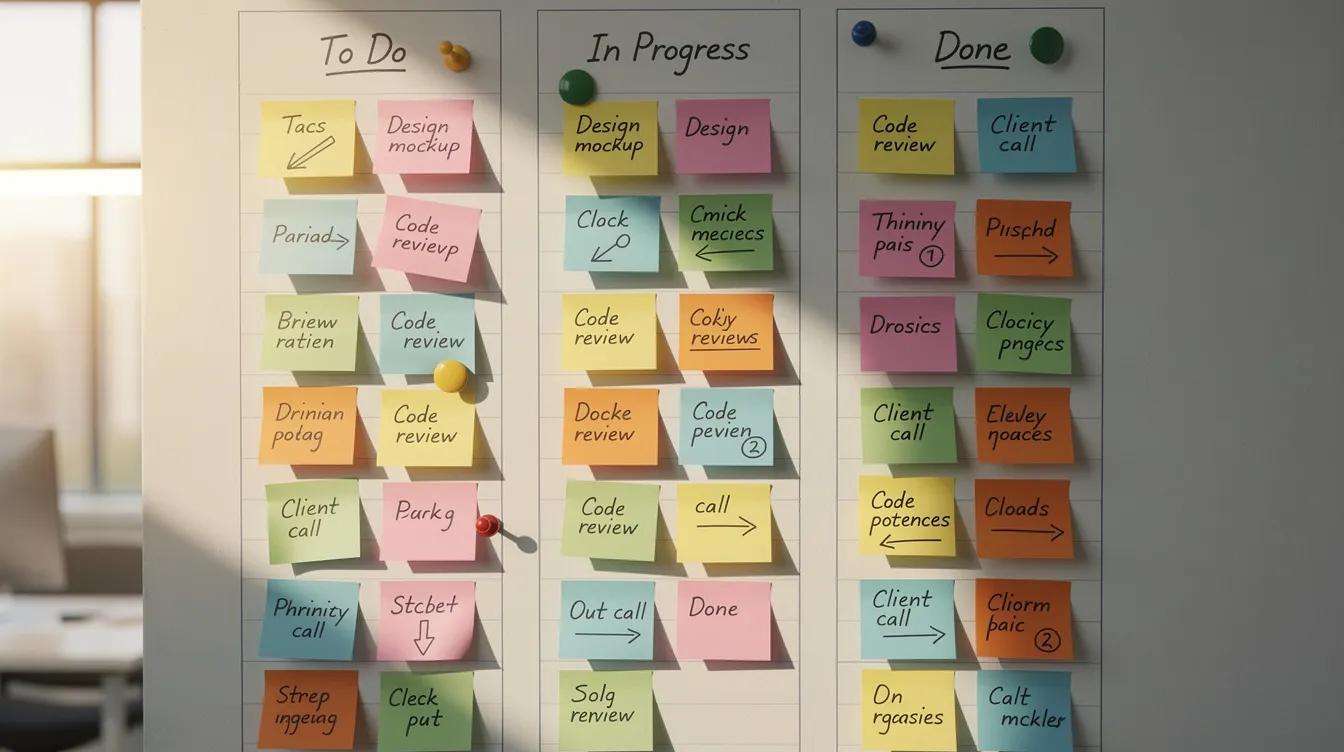
The basic kanban board layout uses columns representing workflow stages:
| Backlog | To Do | Doing (max 3) | Done |
|---|---|---|---|
| Future ideas | This week | Current tasks | Completed |
Cards representing tasks move left to right as work progresses. The critical rule: limit Work In Progress (WIP) to prevent multitasking. Research shows multitasking drops productivity by 40%.
A small remote marketing team in 2026 might use Trello to manage content creation, ad campaigns, and analytics with swimlanes for each team members’ workload distribution.
For individuals, columns might be: Backlog, Today, In Progress, Waiting, Done. Benefits include visual clarity, quick status checks, and reduced overwhelm from seeing flow instead of one long list.
Digital Kanban Tools to Consider
Mainstream options include:
- Trello (free tier available)
- Asana boards
- Notion databases with board view
- Physical whiteboards with sticky notes for small teams
Start with a basic three-column board. Only add complexity (labels, swimlanes, task dependencies) after a few weeks if needed.
Prune your Backlog weekly. Without discipline, it becomes a digital junk drawer of wasted effort and forgotten ideas.
9. The Pomodoro Technique
The pomodoro technique, developed by Francesco Cirillo in the late 1980s using a tomato-shaped kitchen timer, remains one of the most popular time management systems for focused work.
The classic pattern:
- Choose a task
- Set timer for 25 minutes
- Work with intense focus until timer rings
- Take a five minute break
- After four pomodoros, take a 15-30 minute longer break
Pomodoro reduces procrastination by making work less intimidating (“just 25 minutes”) and structures breaks to prevent burnout. Cirillo’s trials showed it can double output for focused work.
A university student in 2026 might use Pomodoro to study for exams, logging completed pomodoros in a notebook to increase productivity over time. Many apps now include a built in pomodoro timer for automatic tracking.
Customize durations (40/10 works for many) while keeping the principle: timed focus + mandatory rest. Pomodoro pairs well with time blocking and distraction-blocking apps.
Who Pomodoro Works Best For
Ideal users include:
- Students needing structure for study sessions
- Remote workers battling home distractions
- Junior developers learning to focus
- People with ADHD who benefit from external time boundaries
It’s less effective for work that flows naturally in longer blocks (deep research, creative writing) unless you extend intervals to 45-50 minutes.
Try one 2-hour Pomodoro block tomorrow morning as an experiment. Track how many pomodoros you complete, then adjust lengths based on your natural rhythm.
10. Time Blocking
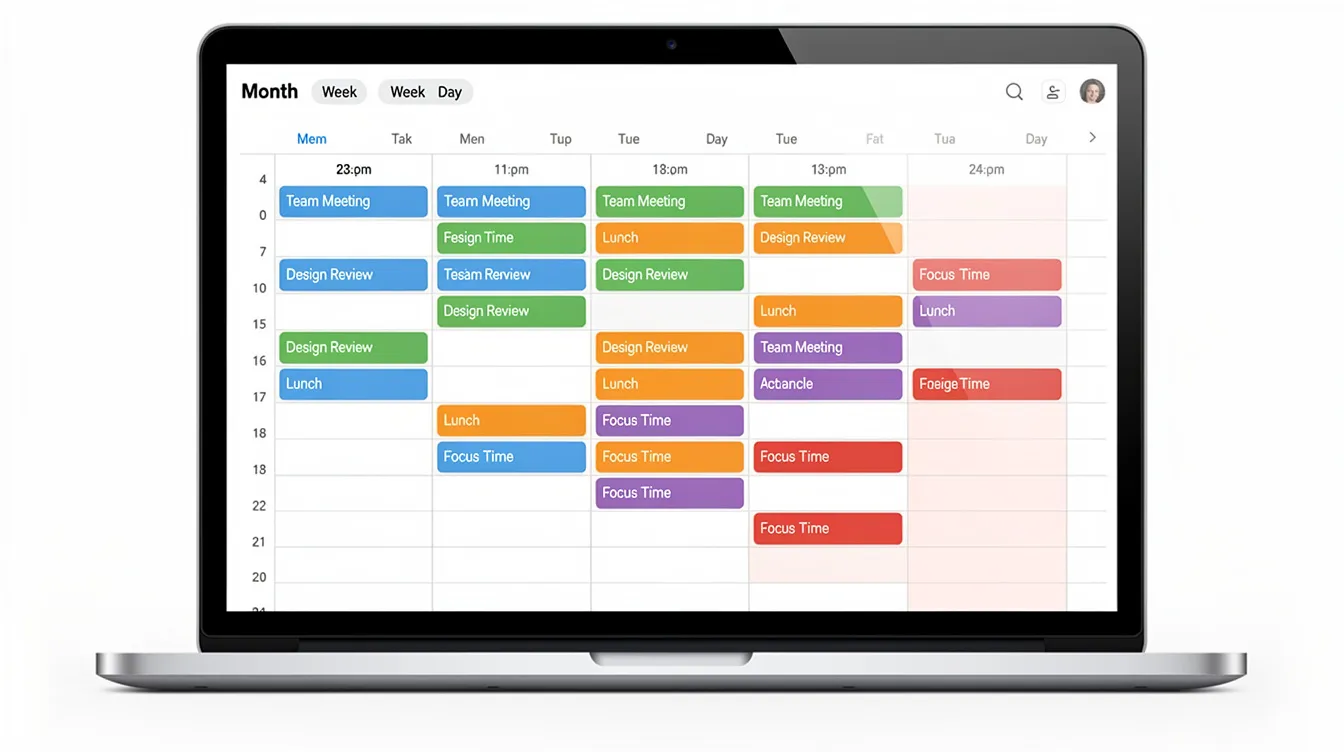
Time blocking means scheduling specific tasks or task types into fixed calendar blocks instead of working from a loose task list. Cal Newport popularized this approach in Deep Work, and knowledge workers in 2026 commonly block “Deep Work,” “Email,” and “Meetings” into dedicated windows.
A sample weekday calendar:
| Time | Block | Color |
|---|---|---|
| 9:00-12:00 | Deep Work | Blue |
| 12:00-1:00 | Lunch | Green |
| 1:00-3:00 | Meetings | Yellow |
| 3:00-3:30 | Buffer | Gray |
| 3:30-5:00 | Admin/Email | Orange |
Benefits include fewer decisions during the day, reduced context switching, and clearer boundaries between work and personal lives.
Digital calendars like Google Calendar or Outlook work best, though paper planners also serve well. Always leave at least one daily buffer block for overflow and emergencies.
Who Should Use Time Blocking
Time blocking serves:
- Managers and consultants juggling meetings and strategic work
- Freelancers needing to protect billable hours
- Content creators batching similar tasks
- Work-from-home parents safeguarding uninterrupted focus windows
Caution: Overly rigid schedules fail. Treat blocks as prototypes and revise weekly based on what actually happened versus what you planned. This flexibility creates better work life balance over time.
11. Time Tracking as a System
Time tracking serves both as a measurement tool and a management system for increasing awareness of where hours actually go. Many professionals discover shocking gaps between perceived and actual time spent on current tasks.
Basic methods include:
- Manual logs in 15-minute increments
- Desktop time tracking software like RescueTime
- Project-based time tracker tools with detailed reports
- Simple spreadsheets for tracking hours
A freelance designer tracking billable hours versus non-billable time in May 2026 might discover they’re only billing 60% of work hours. This insight drives pricing adjustments, often yielding 15-18% margin improvements.
Time tracking uncovers hidden time sinks (social media, context switching, over-servicing clients) and reveals unrealistic estimates. You can’t manage employee time effectively—or your own—without knowing where it actually goes.
Who Benefits Most from Time Tracking
Primary beneficiaries:
- Freelancers and consultants billing by hour
- Agency workers optimizing employee productivity
- Remote employees proving output to managers
- Small teams implementing workload distribution
TimeHackz recommends short experiments: 1-2 weeks of tracking rather than permanent micromanagement. Use time tracking apps like Toggl Track or Clockify, then pair findings with another system (Time Blocking, 1-3-5) to turn insights into action.
12. Agile Results
Agile Results, developed by J.D. Meier at Microsoft, centers on the “Rule of Three”: identify three outcomes for your day, week, month, and year.
The pattern:
- Monday Vision: Set three outcomes for the week
- Daily Wins: Identify three outcomes each morning
- Friday Reflection: Review what worked and what didn’t
A product manager might define three weekly outcomes: ship a feature, recruit a candidate, refine the roadmap. This outcome-focus beats task obsession by ensuring you’re moving toward meaningful results, not just checking boxes.
Agile Results sits well on top of other systems—combine it with GTD for capture or Kanban for visual execution. Use a simple daily note taking system: write “Today’s 3 Wins” each morning and review at day’s end.
13. The ALPEN Method
ALPEN is a German planning method by Lothar J. Seiwert. The acronym translates to:
- A: List all tasks
- L: Estimate time for each
- P: Plan 40% buffer for interruptions
- E: Establish priorities
- N: Note evaluation at day’s end
A consultant planning a client day in June 2026 using ALPEN might list 5 tasks totaling 6 hours, add 2.4 hours buffer in an 8-hour day, prioritize by client impact, then review results at 5 p.m.
ALPEN excels at realistic scheduling and preventing over-commitment. It converts naturally to time blocking by turning estimates into calendar events.
Use a simple template printed daily or create a recurring page in your time management software of choice.
14. The Iceberg Method
The iceberg method, as taught by Ramit Sethi and others, manages information and “hidden work” rather than just visible tasks. The metaphor: your task list is the tip; below the surface lurks research, decisions, interruptions, and reference material.
Practical steps:
- Create a system for capturing notes, links, and ideas
- Organize into clear buckets (Projects, Ideas, References)
- Maintain so information is ready when needed
A content creator in 2026 might curate a “Knowledge Iceberg” in Obsidian containing article ideas, sources, and outlines. When it’s time to write, everything is accessible—reducing the 50% of time typically wasted re-finding information.
Digital Tools for the Iceberg Method
Cross-device options:
- Notion
- Obsidian
- Roam Research
- Google Docs
The key features for success: fast retrieval through consistent tagging and clear naming. Schedule a 15-minute weekly cleanup to archive outdated info and keep your mobile device and desktop synced.
15. Flowtime Technique
The Flowtime Technique is Zoe Read-Bivins’ flexible alternative to Pomodoro that adapts to individual focus spans rather than imposing arbitrary 25-minute limits.
Instead of fixed sessions:
- Start a task and note the time
- Work until natural fatigue or a good stopping point
- Take a proportional break (roughly 1/5 of work duration)
- Log start/stop times
A developer coding for 70 minutes might take a 15-minute break, then log the session. This respects flow states—where immersion thrives beyond short intervals—while providing structure.
Flowtime doubles as light time tracking since you’re recording durations. It pairs well with distraction blockers for entering genuine focus without timer interruptions.
16. MoSCoW Prioritization
MoSCoW is a prioritization framework from project management that adapts well to personal task lists:
- Must have: Non-negotiable, deadline-driven
- Should have: Important but some flexibility
- Could have: Nice if time permits
- Won’t have: Explicitly not this week/sprint
A startup founder in 2026 might sort product backlog items into MoSCoW categories before a development sprint, ensuring the team tackles the right work first.
Use color-coding or tags in your project management software to mark M, S, C, W on tasks. Revisit classifications at the end of each sprint or week to organize tasks based on new information.
17. Zen to Done (ZTD)
Zen to Done is Leo Babauta’s simplified, habit-focused spin on GTD, launched in the late 2000s. Where GTD can overwhelm, ZTD emphasizes building habits one at a time.
Core habits:
- Collect (capture everything)
- Process (decide what things mean)
- Plan (set weekly/daily priorities)
- Do (focus on one task at a time)
- Simple lists (keep systems minimal)
- Organize (a place for everything)
- Review (weekly check-ins)
- Simplify (reduce goals and tasks)
- Routine tasks (batch similar activities)
- Find your passion (align work with meaning)
A reader starting in May 2026 might focus only on the “Collect” habit for 30 days, then add “Process” the following month. This gradual approach prevents the overwhelm that causes many GTD users to abandon ship.
Choose 2-3 core habits, not all ten, to keep things sustainable.
18. Supporting Micro-Systems (2-Minute Rule, Eat That Frog, 4D)
Three smaller techniques complement any major system:
The 2-Minute Rule (from GTD): If a task takes under 2 minutes, do it immediately. This prevents small items from clogging your system and clears roughly 30% of typical lists.
Eat That Frog (Brian Tracy): Tackle your most important—often hardest—task first thing in the morning. Getting the “frog” done creates momentum that carries through the day.
The 4D Technique: Process inboxes by immediately deciding to:
- Do it now
- Delegate tasks to someone else
- Defer to a later date
- Delete it entirely
Concrete application: Apply 4D to email for 15 minutes at 11 a.m. daily, use the 2-Minute Rule during that session, and assign tasks that need immediate attention to others. Pick one “frog” for each morning.
These add-ons work regardless of which primary time management method you choose.
How to Choose the Right Time Management System for You
Rather than theory, here’s a practical decision framework:
Ask yourself:
- How much flexibility do you have each day?
- Do you prefer structure or intuition?
- Are you more visual or text-oriented?
- Do you work solo or with team members?
- Do you need to track time for billing or reporting?
Pick exactly one “primary” system and one “supporting” method for the next 14 days. Examples: Kanban + Pomodoro, GTD + Time Blocking, 1-3-5 + Eat That Frog.
Switching systems constantly creates friction. Experimentation is good, but commit to defined trials before moving on.
TimeHackz provides printable worksheets and Notion/Google Docs templates to help readers create tasks and test systems quickly.
Putting Time Management Systems into Daily Life
Adopting any system requires:
- Setup session: 30-90 minutes initial configuration
- Daily check-in: 5-15 minutes
- Weekly review: 20-45 minutes
Sample implementation weekend (Saturday, March 21, 2026):
- Morning: Choose your primary system from this article
- Afternoon: Set it up (notebook, app, calendar)
- Sunday: Schedule your first week using the system
- Monday: Begin with just working hours, not your entire life
Common failure points:
- Over-customizing before you understand basics
- Skipping weekly reviews
- Unrealistic expectations
- Using four systems simultaneously
Simple troubleshooting: If you ignore your system for three days, do a 10-minute reset and reduce complexity by half. A simpler system you use beats a sophisticated one gathering dust.
After 30 days, measure concrete outcomes: reduced overtime hours, fewer missed deadlines, more evenings fully off-screen. These track productivity patterns better than vague feelings.
TimeHackz Resources and Next Steps
TimeHackz exists to help you build sustainable time habits that reduce stress and save time—not just “do more” but live better.
Your action plan:
- Choose one system from this article today
- Set a specific start date within 48 hours
- Commit to a 14-day trial before judging results
Our free email newsletter includes a time management ebook walking you through a 7-day implementation challenge. It’s designed for productive employees and overwhelmed parents alike.
There is no single “perfect” time management tool. The best system is the one you’ll consistently use and adapt. The 1-3-5 Rule might click for you while your colleague thrives with GTD. Both are valid.
What matters is this: mastering even one or two time management systems can reclaim several hours each week. Hours you can invest in health, family, learning, or work that actually matters to you.
Stop reading about productivity. Pick a system. Start tomorrow.