ByDesign App Review: A 9-in-1 app to Organize Your Life and Work
Staying organized takes more than a to-do list. Between meetings, deadlines, habits, and personal goals, it’s easy to lose track of things. That’s where a planning app comes in to keep your life and work organized. It’s a space where you can plan your days and goals, take notes, and build habits that stick.
ByDesign is one app built for exactly this job. This all-in-one planning app that lets you bring your calendar, tasks, notes, and goals together in one place, so you’re not switching between five different tools just to stay on track.
To see if it delivers, I used ByDesign like a real user would. I built a daily task system, synced it with my calendar, set up habit trackers, and tested its notes and goal features. This helped me see how ByDesign performs in everyday use, not just on paper.
In this ByDesign App review, I’ll cover everything from the interface and core features to pricing and where it still falls short. By the end, you’ll know if it deserves a spot on your home screen.

Key Takeaways: ByDesign Review
- ByDesign brings your whole routine into one app: Calendar, tasks, notes, habits, and goals all live together, with a built-in calendar that syncs both ways with Google, Apple, and Outlook.
- It’s flexible enough to fit how you actually work: Pages can be used for tasks, notes, journaling, or documentation without forcing you to pick a category upfront, and workspaces can be built around anything from daily planning to side projects.
- It’s built for individuals, not large teams: ByDesign shines as a personal all-in-one system, especially for people with ADHD or scattered workflows, but it lacks the depth teams need for complex project management.
- Extra tools like Pomodoro and widgets add real value: A built-in Pomodoro timer, home screen widgets, and natural language input make it easy to stay focused and track goals without constantly opening the app.
- Pricing is affordable, with no free plan: A 7-day free trial is available, with monthly billing at $6, an annual plan around $4/month, and a $250 lifetime option for long-term users.
What Is ByDesign?
ByDesign is an all-in-one planning app built to help you organize your work and personal life in one place. Instead of using separate apps for your calendar, tasks, notes, and habits, ByDesign brings all of these tools together under one roof.
At its core, ByDesign works like a digital planner for life management. You can schedule your day, write notes, track habits, and set goals, all from the same dashboard. It syncs with Google, Apple, and Outlook calendars, so your existing events carry over automatically. You can also type things in plain language, like “Meeting tomorrow at 10 AM,” and ByDesign will turn it into a scheduled event on its own.
The app is available on web, iOS, Android, Mac, and Windows, so you can access your plans from whichever device you’re using. It’s designed mainly for individuals, though it does include basic tools for sharing tasks and collaborating with others.
ByDesign positions itself as more than a to-do list. It’s meant to be a single space where you can plan your day, manage your goals, and build better habits, without needing five different apps to do it.
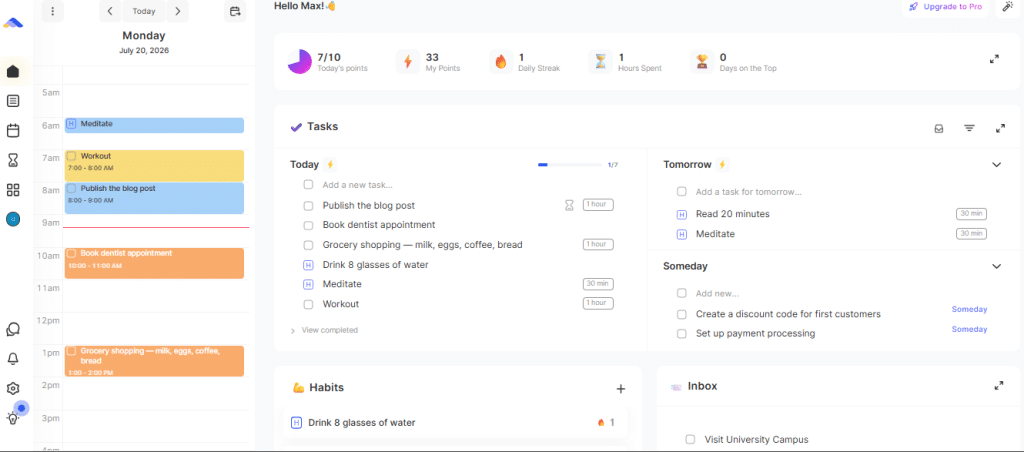
ByDesign Key Features
ByDesign packs a lot into one app. Personally, what I liked most was the combination of planner, habit tracking, the Pomodoro timer, task management, and note-taking in one place. That kind of workflow usually needs three or four separate tools, so having it all together saved me t
ime and kept me from getting distracted by app-switching. This is what makes ByDesign stand out from most productivity apps on the market.
Here’s a look at the features that stood out most during testing.
1. Calendar and Daily Planning
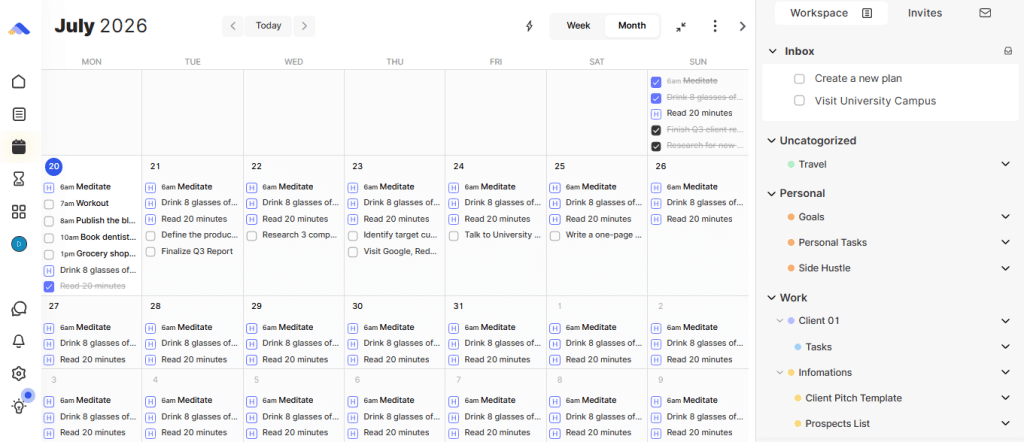
The calendar sits at the center of ByDesign. It syncs both ways with Google and Apple Calendar, so your existing events show up right away. You can drag a task straight into your calendar to schedule it in seconds. ByDesign also offers daily, weekly, and monthly views, which makes it easy to zoom in on today’s to-do list or zoom out to see the bigger picture.
2. Task Management
Tasks in ByDesign are organized into workspaces. There’s also a “See all tasks” view that pulls everything into one list, no matter which workspace it belongs to. You can set reminders so nothing slips through the cracks, break bigger tasks down into sub-tasks, and set priority levels to control what shows up at the top of your list. This is handy if you juggle several projects and don’t want to click through folders to find what’s due today.
3. Notes and Pages
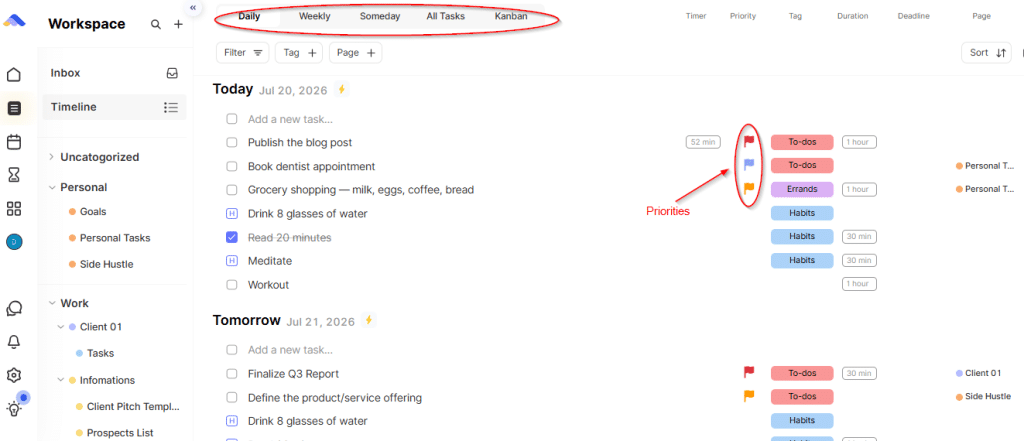
Pages in ByDesign are built to be flexible. You can use them for projects, journaling, planning, documentation, or anything else you’d usually do with a mix of notes and tasks. But unlike other tools, every page in ByDesign comes task-ready. You don’t need to decide whether something is a “note” or a “task.” You can just start typing and figure it out as you go. Pages can also be linked to tasks and goals, and exported to Markdown, which makes ByDesign useful for more than just scheduling. It works as a lightweight knowledge base too.
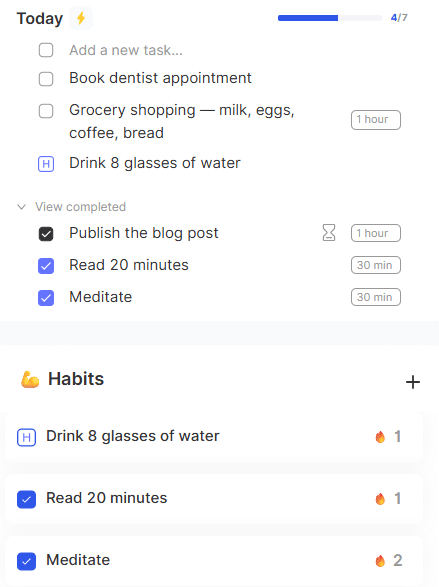
4. Habit Tracking
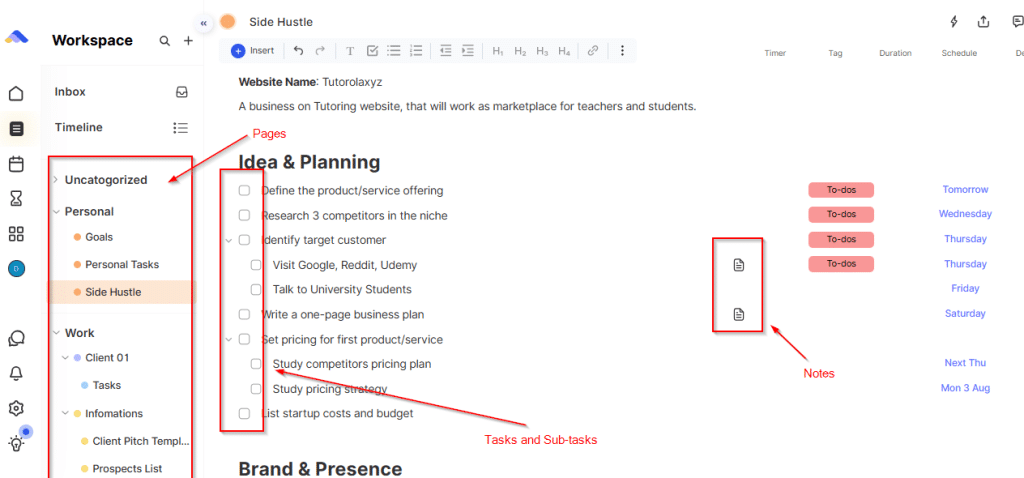
The habit tracker lets you set daily or weekly habits and get reminders through your calendar. Each habit shows up on your dashboard, so you can see your progress at a glance. Some users like that it turns tracking into a simple routine rather than a separate chore.
5. Goals and the Hub
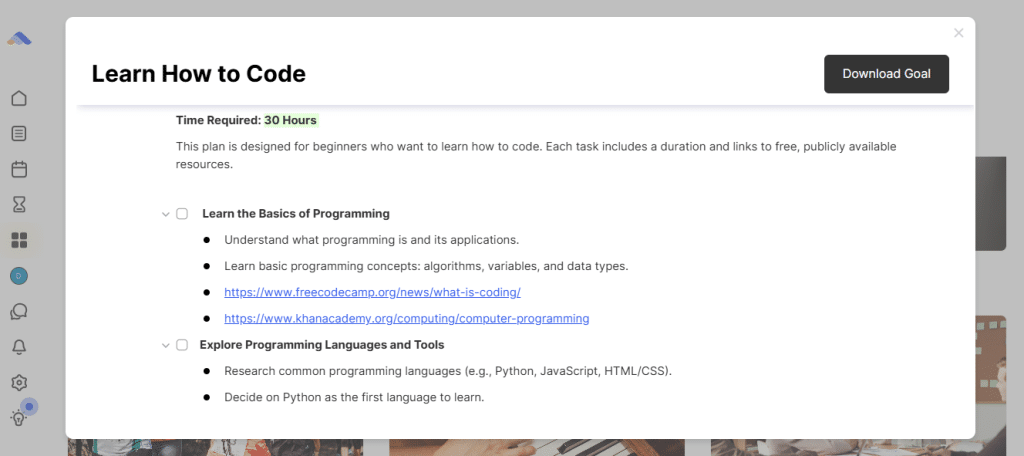
ByDesign has a section called the Hub, where goals, habits, and even courses live together. This is one of the more unique parts of the app. If you set a goal, like learning to code or training for a race, ByDesign helps break it into steps and schedule them on your calendar.
6. AI Auto-Scheduling
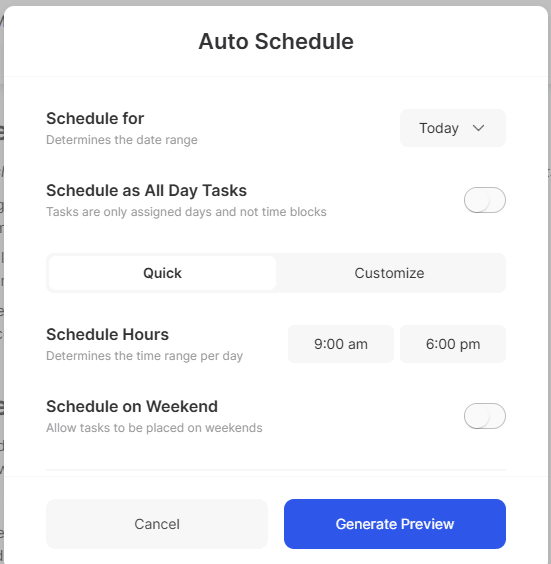
A newer addition is auto-scheduling. With one click, you can ask ByDesign’s AI to schedule your tasks, habits, and goals for the day, week, or month. It’s a small feature, but it saves time if you don’t want to plan everything by hand.
7. Time Tracking and Pomodoro Timer
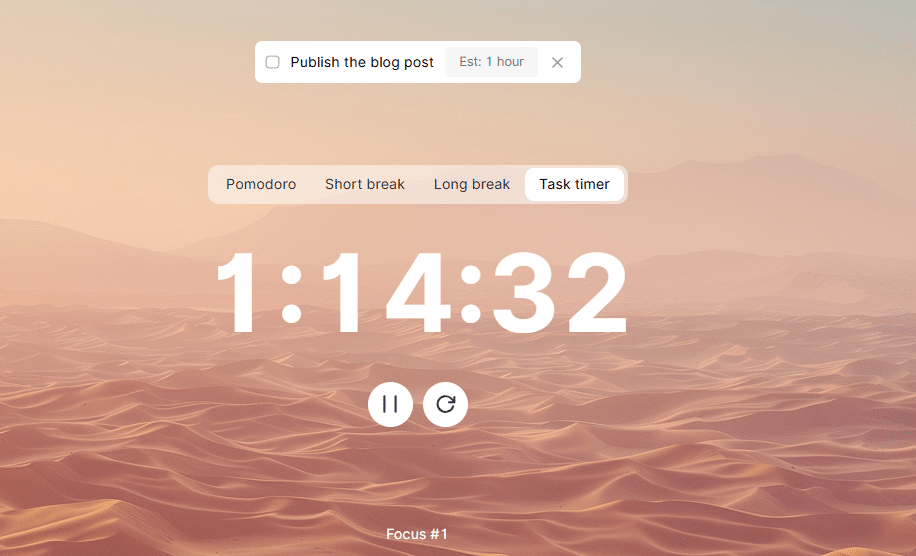
ByDesign also includes a built-in Pomodoro timer, so you can run focused work sessions without opening a separate app. You can attach a timer directly to a task, work in short bursts, and take breaks on a set schedule. This pairs well with the task list, since you can see exactly what you’re working on while the timer runs. For anyone who struggles to stay focused, this feature turns ByDesign into a lightweight time-tracking tool as well as a planner.
ByDesign Pros: What It Wins
ByDesign isn’t the only planning app out there, so it’s worth asking what actually makes it different. Here’s what stood out during testing.
1. One Space for Tasks, Notes, and Files
Most apps split these into separate tools. ByDesign brings tasks, notes, and files into a single space, and lets you add all of them using natural language. This cuts down on the back-and-forth of switching between apps just to capture and organize different types of information.
2. Flexible Views and Drag-and-Drop
ByDesign lets you see your tasks in different views: daily, weekly, or “someday.” This makes it easy to focus on today’s list or plan further ahead when you’re ready. You can also drag and drop tasks, notes, or entire pages to rearrange your workspace. On top of that, you can switch between light and dark themes, so the app is easier on your eyes no matter what time of day you’re using it.
3. Broader Than Task Managers Like Asana, Trello, or Todoist
Tools like Asana, Trello, and Todoist are built mainly for task management. They do that job well, but they don’t cover habits, notes, or goals. ByDesign brings all of these into one app. So instead of using Todoist for tasks and a separate app for habits, you get both in the same place, connected to the same calendar.
4. Works Across All Your Devices
ByDesign is available on web, iOS, Android, Mac, and Windows. Your tasks, notes, and calendar stay in sync no matter which device you’re using. There are also home screen widgets for iOS and Mac, so you can check your tasks and habits without even opening the app.
5. Gamification That Makes Tasks Feel Rewarding
ByDesign gives you points for completing tasks. It’s a small feature, but it adds a bit of motivation to finish what’s on your list. This kind of light gamification isn’t common in planning apps, and it gives ByDesign a slightly different feel from most task management tools like Asana or Trello.
6. Natural Language Input
You can type something like “Meeting tomorrow at 10 AM,” and ByDesign will automatically turn it into a scheduled event. This saves time compared to manually filling out a task form, especially if you’re capturing ideas quickly throughout the day.
7. Goals and Courses Live in the Same App
Most planning apps stop at tasks and calendars. ByDesign goes a step further with its Hub, where goals, habits, and even courses live together. If you’re working toward something like learning a new skill, ByDesign helps break it into steps and schedules it on your calendar. This is a feature you won’t find in Notion, Asana, or Todoist.
ByDesign cons: Where it Struggles
No app is perfect, and ByDesign has a few rough edges worth knowing about before you commit.
1. Import Tools Need Work
If you’re switching from Notion or another app, moving your data over isn’t smooth. ByDesign doesn’t have a dedicated import tool, so you end up with a messy data dump instead of a clean transfer. This makes ByDesign a much better fit if you’re starting fresh rather than migrating years of notes and tasks from another platform.
2. Missing Features Some Users Expect
A few common productivity features aren’t available yet.There’s also no undo/redo option, no whiteboard or handwriting support, and no contact syncing. None of these are dealbreakers, but they’re the kind of small gaps that stand out once you’re using the app daily.
3. AI Features Are Still in Beta
The AI goals feature is currently in beta, and access is limited through a waitlist. So while auto-scheduling is available, some of the more advanced AI planning tools aren’t fully rolled out yet. If AI-driven planning is the main reason you’re interested in ByDesign, it’s worth knowing this part of the app is still a work in progress.
4. Limited Customization
ByDesign’s interface is clean, but some users want more control over it. There’s no CNAME or personal branding option, and the overview dashboard doesn’t offer much flexibility for rearranging widgets. Tags are also limited to a single list, so you can’t separate them into categories the way you might in more customizable tools.
5. Built for Individuals, Not Large Teams
While ByDesign does support collaboration, its license structure is built around individual use. It works well as a personal planner or for small teams, but it isn’t designed to scale the way tools like Asana or Monday.com are for larger organizations managing multiple departments and complex workflows.
ByDesign Pricing
ByDesign doesn’t offer a free plan, but you can try it out with a 7-day free trial before committing. Once the trial ends, pricing is simple and based on two options:
- Monthly plan: $6 per month
- Annual plan: Works out to around $4 per month, billed yearly (about $48 per year)
This puts ByDesign in the same price range as other personal planning apps, and it’s noticeably cheaper than many team-focused project management tools. Since ByDesign is built mainly for individuals rather than large teams, this pricing makes sense.
You’re not paying per seat or unlocking features tier by tier. Instead, you get full access to tasks, notes, calendar sync, habits, and goals right from the start.
ByDesign has also run lifetime deal promotions through platforms like AppSumo, where users could pay a one-time fee (historically around $250) instead of a recurring subscription. If you plan to use ByDesign for several years, a lifetime deal can work out cheaper in the long run. But since these deals aren’t always available, it’s worth checking ByDesign’s official pricing page for current options before deciding.
Overall, ByDesign’s pricing is affordable for what it offers. You’re getting a calendar, task manager, note-taking tool, habit tracker, and goal planner for less than the cost of a single specialized app in most cases.
Who Should (and Shouldn’t) Use ByDesign
After spending real time in the app, it’s clear ByDesign isn’t built for everyone. But for the right person, it fills a gap that other tools miss.
Great For:
- Individuals wanting one all-in-one system — If you’re tired of switching between a calendar app, a task manager, and a separate notes app, ByDesign brings all of that under one roof.
- People with ADHD or scattered workflows — The clean interface and built-in structure make it easier to see everything in one place, instead of juggling reminders across five different tools.
- Notion refugees starting fresh — If you want a built-in calendar or you’re tired of building your own systems from scratch, ByDesign gives you that structure right out of the box. This works best if you’re not carrying over years of existing data.
- Anyone who wants habits, goals, and tasks connected — Since these all live in one app, you don’t need separate tools to track your routine alongside your to-do list.
- Side hustlers and solo entrepreneurs — Since Pages can hold tasks, notes, and plans all in one place, ByDesign works well for organizing a small business or side project alongside your personal life, without needing a separate project management tool.
Not Ideal For:
- Large teams managing complex projects — ByDesign supports collaboration and shared workspaces, but it lacks the depth of permissions, reporting, and project tracking that tools like Asana or monday.com offer.
- Teams that will outgrow a simple setup — Groups larger than a handful of people will likely need more advanced project management features than ByDesign provides.
- Users needing advanced import tools — ByDesign lacks a proper import tool, so moving years of notes and tasks from Notion or another platform turns into manual cleanup work.
- Anyone who needs a smooth, structured migration — If switching tools without friction matters to you, this is worth factoring in before you commit.
Wrapping Up: Is ByDesign Worth It?
After testing it, ByDesign proves it’s more than a to-do list. It’s built for personal productivity and personal life management at the same time, which is what makes it stand out. Most apps ask you to pick one or the other. ByDesign tries to handle both, and for the most part, it succeeds.
As an all-in-one app, it brings your calendar, tasks, notes, habits, and goals together in a way that actually feels connected, not just bundled. This makes it ideal for individuals who want one system to run their entire day, instead of piecing together a calendar app, a task manager, and a habit tracker separately.
That said, ByDesign isn’t perfect. The import process still needs work, a few AI features are in beta, and some smaller conveniences like undo/redo are missing. It’s also not built for large teams managing complex projects, so it’s best suited for individuals or small groups rather than growing organizations.
On pricing, ByDesign is reasonable for what it offers. There’s no free plan, but the 7-day trial gives you enough time to test it out. Monthly billing runs $6, the annual plan works out to about $4 a month, and a $250 lifetime option is available if you’re confident you’ll stick with it long-term.
Bottom line: If you want an app that goes beyond a simple to-do list and actually helps manage your personal life and productivity together, ByDesign is worth trying. If you need enterprise-level project management or a smooth migration from another tool, it may not be ready for you yet.

Frequently Asked Questions
Is ByDesign free?
No, ByDesign doesn’t have a free plan. You get a 7-day free trial to test it out before you’re asked to pay.
How much does ByDesign cost?
The monthly plan is $6. If you pay annually, it works out to about $4 per month, or roughly $48 per year. There’s also a one-time lifetime plan for $250, which can pay for itself if you use the app for about five years or more.
Does ByDesign work on mobile?
Yes. ByDesign is available on web, iOS, Android, Mac, and Windows, so your tasks and calendar stay in sync across all your devices.
Can I import my data from Notion or another app?
You can, but the process isn’t smooth. ByDesign doesn’t have a dedicated import tool, so your data comes in as a raw dump that you’ll need to organize yourself. It works best if you’re starting fresh.
Does ByDesign support teams?
Yes, to an extent. You can invite teammates, share links, and publish pages as websites. But it’s not built for large teams or complex project management the way tools like Asana or monday.com are.
Is ByDesign good for people with ADHD?
Many users say yes. The clean interface and built-in structure make it easier to keep tasks, habits, and goals in one place, without needing to manage several separate apps.
Does ByDesign have a Pomodoro timer?
Yes. You can attach a Pomodoro timer directly to a task, which makes it easier to stay focused during work sessions without opening a separate app.